×

带有Micropython的Onesignal库

消耗积分:0 | 格式:zip | 大小:0.00 MB | 2023-06-13

分享资料个

描述

几年前我学习了 python,但我找不到任何与之相关的东西。有趣吧?你可以用 python 做很多事情,但我特别关注硬件中的 python,而且我身边没有树莓派电脑(它们的价格最近一直在上涨)。然后我发现了 micropython,它允许我为 Espressif ESP8266 和 ESP32 等低内存设备编写 python 代码(它们是我最喜欢的板子,在评论部分留下你最喜欢的板子,以便我查看它们)。然后砰!我的 micropython 之旅开始了,在磨练了我的 python 技能几个月之后,我决定通过为我经常使用的 Onesignal 服务构建一个库来测试它。像我这样的菜鸟,我拼命寻找 Arduino 框架的 OneSignal 库,但找不到,所以我不得不学习用Arduino发出请求,这给了我很多发出请求的经验,python相对容易编写所以我决定为micropython创建库作为回馈嵌入式社区的一种方式。我计划在不久的将来为 Arduino 编写一个。

安装库

我计划稍后通过upip安装成为可能,但现在,您可以从我的 GitHub存储库下载它该库还运行在常规的大蟒蛇上。

将 OneSignal 库添加到文件系统

我正在使用 Thonny ide,所以我将使用 Thonny 进行解释。

在 Thonny 中打开 onesignal.py 文件,转到文件并单击“另存为”
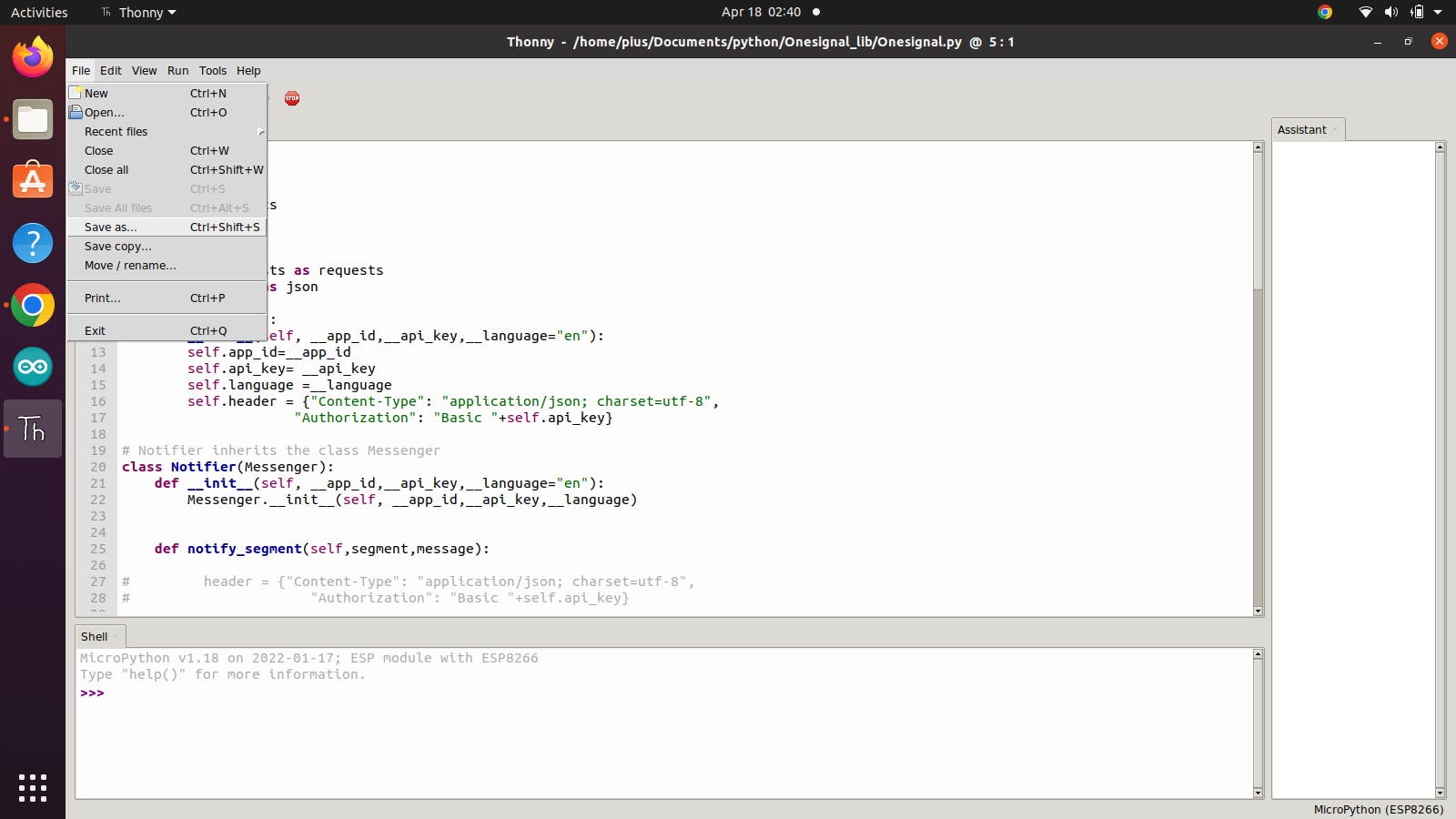
 

pYYBAGSAhGSABs_WAAFLNCJ5Ykc339.png


然后单击“micropython device”并输入库名称“Onesignal.py”并单击“保存”。
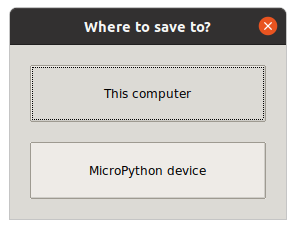
 

poYBAGSAhGeAB4K4AAANpJGsoJY856.png


发送推送通知

首先,我们必须从库中导入 Notifier 对象

`从 Onesignal 导入通知程序`

然后用类创建一个对象

notifier= Notifier("APP ID","API KEY","en")

OneSignal 有一个叫做细分的东西,它允许您将订阅者分组到不同的类别;从而允许您向特定人群发送通知。

要向所有订阅者发送“你好”消息,代码如下所示。

notifier.notify_segment("Subscribed Users","hello") # send to a particular segment

要阅读有关 Onesignal 细分市场的更多信息,请单击此处

假设你为你的家建立了一个面部识别设备,当有人在门口时通知你家里的每个人,但你希望只有你在你的女朋友在门口时得到通知,这可以使用 OneSignal 来完成“玩家 ID” ”。

OneSignal 为您的每个订阅者分配一个特定的“玩家 ID”,该 ID 对每个订阅者都是唯一的,可用于向特定订阅者发送通知。

notifier.notify_user("your player id", "hi Pius, Jessica is at the door")# send to a specific user

发送短信

在发送短信之前,您必须创建一个 Onesignal 短信应用程序,我不会在本文中讨论它,但这里有一个 [链接]( https://documentation.onesignal.com/docs/sms-quickstart )关于如何设置。

创建应用程序后,您需要找到您的应用程序 ID 和 API 密钥,您可以通过单击设置,然后单击密钥和 ID,在您的消息传递应用程序中找到它们
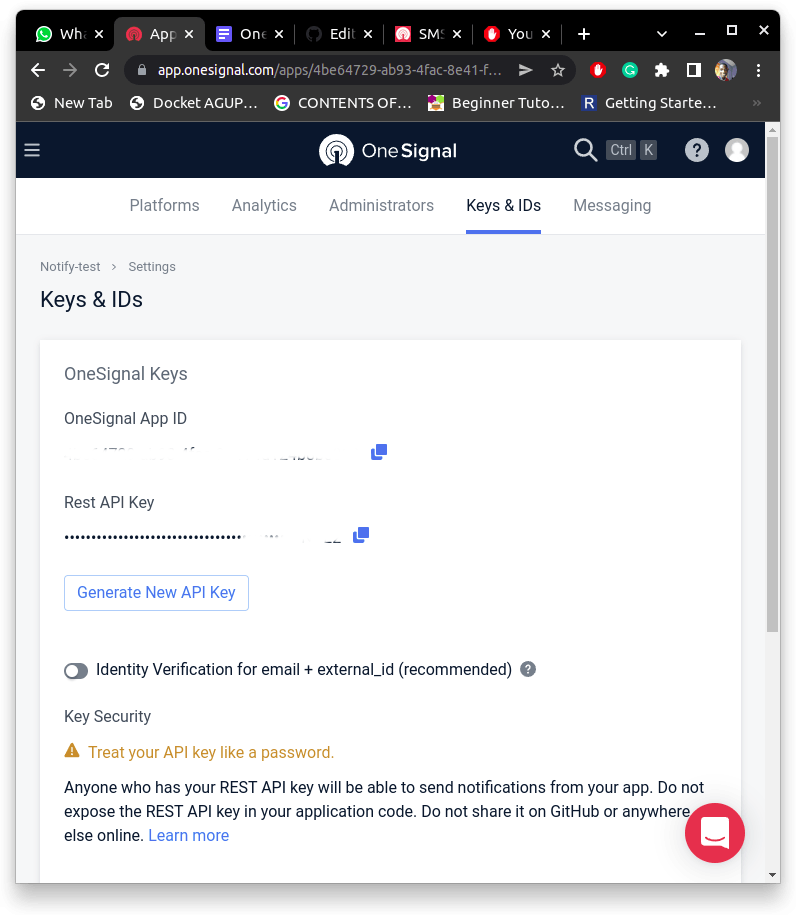
 

poYBAGSAhGqAWtA0AACF3vdo4hs161.png


发送短信

首先,我们需要从库中导入 SMS_Messenger 类

from Onesignal import  SMS_Messenger

使用您的 App ID、API 密钥、Twilio 电话号码、发件人姓名和语言创建该类的对象。

messenger =SMS_Messenger (
"Zbe1d80b-1234-5678-91f2-f27cc107e112",
"ABCDEFGHIJKLMNOpqrstuvwxyzbjtenarsjcdutavdkats",
["Twilio phone number"],
"sender's name",
"en"
)

要发送短信,请使用以下代码行

messenger.send_text("Hello",["recipient phone number"]) # make sure phone number is added to your onesignal subscribers

发送邮件

首先,我们导入邮件程序类

from Onesignal import  Mailer

使用您的 App ID、API 密钥和语言创建 Mailer 类的对象

mailer=Mailer(
"Zbe1d80b-1234-5678-91f2-f27cc107e112",
"ABCDEFGHIJKLMNOpqrstuvwxyzbjtenarsjcdutavdkats",
"en")

创建变量来保存邮件的主题和正文

subject= "cat facts"
body= """<html>
<head>Welcome to Cat Factshead>
<body>
<h1>Welcome to Cat Facts<h1>
<h4>Learn more about everyone's favorite furry companions!h4>
<hr/>
<p>Hi Nick,p>
<p>Thanks for subscribing to Cat Facts! We can't wait to surprise you with funny details about your favorite animal.p>
<h5>Today's Cat Fact (March 27)h5>
<p>In tigers and tabbies, the middle of the tongue is covered in backward-pointing spines, used for breaking off and gripping meat.p>
<a href='https://catfac.ts/welcome'>Show me more Cat Factsa>
<hr/><p><small>(c) 2018 Cat Facts, incsmall>p><p><small><a href='[unsubscribe_url]'>Unsubscribea>small>p>body>
html>"""

然后我们使用 Mailer 类中的“send”函数发送一封电子邮件

要使用玩家 ID 发送电子邮件,请使用这行代码

mailer.send_mail(body,subject,"6392d41a-b776-4c7b-as20-cd58t32y3a96")

要通过他们的电子邮件地址向订阅者发送电子邮件,这行代码

mailer.send_mail(body,subject,emails=["janedoe@gmail.com"])

感谢您阅读我的文章。如果您对 Onesignal 库的 Arduino 版本感兴趣,请关注我,以便在我发布时收到通知。如果您发现代码中有任何可以改进的地方,我还建议您在 GitHub 低内存上创建问题和拉取请求。再次感谢。


声明:本文内容及配图由入驻作者撰写或者入驻合作网站授权转载。文章观点仅代表作者本人,不代表电子发烧友网立场。文章及其配图仅供工程师学习之用,如有内容侵权或者其他违规问题,请联系本站处理。 举报投诉

评论(0)
发评论

下载排行榜

全部0条评论

快来发表一下你的评论吧 !

'+ '

'+ '

'+ ''+ '
'+ ''+ ''+ '
'+ ''+ '' ); $.get('/article/vipdownload/aid/'+webid,function(data){ if(data.code ==5){ $(pop_this).attr('href',"/login/index.html"); return false } if(data.code == 2){ //跳转到VIP升级页面 window.location.href="//m.obk20.com/vip/index?aid=" + webid return false } //是会员 if (data.code > 0) { $('body').append(htmlSetNormalDownload); var getWidth=$("#poplayer").width(); $("#poplayer").css("margin-left","-"+getWidth/2+"px"); $('#tips').html(data.msg) $('.download_confirm').click(function(){ $('#dialog').remove(); }) } else { var down_url = $('#vipdownload').attr('data-url'); isBindAnalysisForm(pop_this, down_url, 1) } }); }); //是否开通VIP $.get('/article/vipdownload/aid/'+webid,function(data){ if(data.code == 2 || data.code ==5){ //跳转到VIP升级页面 $('#vipdownload>span').text("开通VIP 免费下载") return false }else{ // 待续费 if(data.code == 3) { vipExpiredInfo.ifVipExpired = true vipExpiredInfo.vipExpiredDate = data.data.endoftime } $('#vipdownload .icon-vip-tips').remove() $('#vipdownload>span').text("VIP免积分下载") } }); }).on("click",".download_cancel",function(){ $('#dialog').remove(); }) var setWeixinShare={};//定义默认的微信分享信息,页面如果要自定义分享,直接更改此变量即可 if(window.navigator.userAgent.toLowerCase().match(/MicroMessenger/i) == 'micromessenger'){ var d={ title:'带有Micropython的Onesignal库',//标题 desc:$('[name=description]').attr("content"), //描述 imgUrl:'https://'+location.host+'/static/images/ele-logo.png',// 分享图标,默认是logo link:'',//链接 type:'',// 分享类型,music、video或link,不填默认为link dataUrl:'',//如果type是music或video,则要提供数据链接,默认为空 success:'', // 用户确认分享后执行的回调函数 cancel:''// 用户取消分享后执行的回调函数 } setWeixinShare=$.extend(d,setWeixinShare); $.ajax({ url:"//www.obk20.com/app/wechat/index.php?s=Home/ShareConfig/index", data:"share_url="+encodeURIComponent(location.href)+"&format=jsonp&domain=m", type:'get', dataType:'jsonp', success:function(res){ if(res.status!="successed"){ return false; } $.getScript('https://res.wx.qq.com/open/js/jweixin-1.0.0.js',function(result,status){ if(status!="success"){ return false; } var getWxCfg=res.data; wx.config({ //debug: true, // 开启调试模式,调用的所有api的返回值会在客户端alert出来,若要查看传入的参数,可以在pc端打开,参数信息会通过log打出,仅在pc端时才会打印。 appId:getWxCfg.appId, // 必填,公众号的唯一标识 timestamp:getWxCfg.timestamp, // 必填,生成签名的时间戳 nonceStr:getWxCfg.nonceStr, // 必填,生成签名的随机串 signature:getWxCfg.signature,// 必填,签名,见附录1 jsApiList:['onMenuShareTimeline','onMenuShareAppMessage','onMenuShareQQ','onMenuShareWeibo','onMenuShareQZone'] // 必填,需要使用的JS接口列表,所有JS接口列表见附录2 }); wx.ready(function(){ //获取“分享到朋友圈”按钮点击状态及自定义分享内容接口 wx.onMenuShareTimeline({ title: setWeixinShare.title, // 分享标题 link: setWeixinShare.link, // 分享链接 imgUrl: setWeixinShare.imgUrl, // 分享图标 success: function () { setWeixinShare.success; // 用户确认分享后执行的回调函数 }, cancel: function () { setWeixinShare.cancel; // 用户取消分享后执行的回调函数 } }); //获取“分享给朋友”按钮点击状态及自定义分享内容接口 wx.onMenuShareAppMessage({ title: setWeixinShare.title, // 分享标题 desc: setWeixinShare.desc, // 分享描述 link: setWeixinShare.link, // 分享链接 imgUrl: setWeixinShare.imgUrl, // 分享图标 type: setWeixinShare.type, // 分享类型,music、video或link,不填默认为link dataUrl: setWeixinShare.dataUrl, // 如果type是music或video,则要提供数据链接,默认为空 success: function () { setWeixinShare.success; // 用户确认分享后执行的回调函数 }, cancel: function () { setWeixinShare.cancel; // 用户取消分享后执行的回调函数 } }); //获取“分享到QQ”按钮点击状态及自定义分享内容接口 wx.onMenuShareQQ({ title: setWeixinShare.title, // 分享标题 desc: setWeixinShare.desc, // 分享描述 link: setWeixinShare.link, // 分享链接 imgUrl: setWeixinShare.imgUrl, // 分享图标 success: function () { setWeixinShare.success; // 用户确认分享后执行的回调函数 }, cancel: function () { setWeixinShare.cancel; // 用户取消分享后执行的回调函数 } }); //获取“分享到腾讯微博”按钮点击状态及自定义分享内容接口 wx.onMenuShareWeibo({ title: setWeixinShare.title, // 分享标题 desc: setWeixinShare.desc, // 分享描述 link: setWeixinShare.link, // 分享链接 imgUrl: setWeixinShare.imgUrl, // 分享图标 success: function () { setWeixinShare.success; // 用户确认分享后执行的回调函数 }, cancel: function () { setWeixinShare.cancel; // 用户取消分享后执行的回调函数 } }); //获取“分享到QQ空间”按钮点击状态及自定义分享内容接口 wx.onMenuShareQZone({ title: setWeixinShare.title, // 分享标题 desc: setWeixinShare.desc, // 分享描述 link: setWeixinShare.link, // 分享链接 imgUrl: setWeixinShare.imgUrl, // 分享图标 success: function () { setWeixinShare.success; // 用户确认分享后执行的回调函数 }, cancel: function () { setWeixinShare.cancel; // 用户取消分享后执行的回调函数 } }); }); }); } }); } function openX_ad(posterid, htmlid, width, height) { if ($(htmlid).length > 0) { var randomnumber = Math.random(); var now_url = encodeURIComponent(window.location.href); var ga = document.createElement('iframe'); ga.src = 'https://www1.elecfans.com/www/delivery/myafr.php?target=_blank&cb=' + randomnumber + '&zoneid=' + posterid+'&prefer='+now_url; ga.width = width; ga.height = height; ga.frameBorder = 0; ga.scrolling = 'no'; var s = $(htmlid).append(ga); } } openX_ad(828, '#berry-300', 300, 250);