×

M5StickC&V的应援表开源硬件

消耗积分:0 | 格式:zip | 大小:0.17 MB | 2022-12-22

王飞云

分享资料个

描述

我发了手表给你的运动和欢呼。

我叫加油表!!

成像加速数据

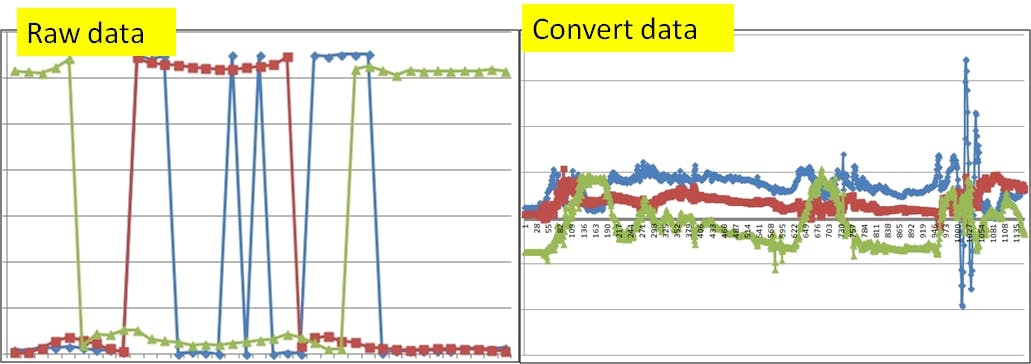
M5StickV 的加速度被成像。加速度以 x = R,y = G,z = B 的 8x8 RGB 输入。这是必需的,因为 KPU 仅支持图像。


MPU 输出的数据需要转换,因为减号是补号。

accel = i2c.readfrom_mem(MPU6886_ADDRESS, MPU6886_ACCEL_XOUT_H, 6)
accel_x = (accel[0]<<8|accel[1])
accel_y = (accel[2]<<8|accel[3])
accel_z = (accel[4]<<8|accel[5])

if accel_x>32768:
    accel_x=accel_x-65536
if accel_y>32768:
    accel_y=accel_y-65536
if accel_z>32768:
    accel_z=accel_z-65536
poYBAGOiaoGAGdbcAAC0p5dfcMU947.jpg
 

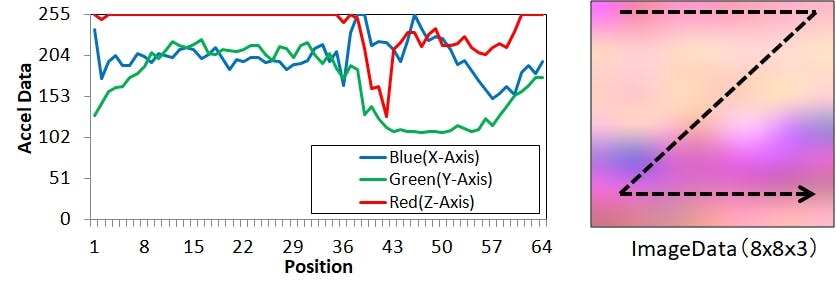
加速度的动态运动表现为云纹。在X方向进行8个点后,在Y点方向进行。由于图像中垂直和水平像素的数量、传感器的采样率和手部运动的周期性。

将图像数据保存到 SD 卡。
pYYBAGOiaoaAN-teAAB4wIp50LU261.jpg
 

https://github.com/anoken/CheeringWatch_M5StickC-V/blob/master/m5stickv_maixpy/m5stickv_imu_to_pixel_record_191027.py

为 Ubuntu 安装 TensorFlow/Keras

本课程使用 Ubuntu18.04 或适用于 Linux 的 Windows 子系统。

安装 Miniconda 并创建 Python 环境。Miniconda 安装程序是从 Miniconda 网站下载的。

Miniconda:https://docs.conda.io/en/latest/miniconda.html

wget https://repo.anaconda.com/miniconda/Miniconda3-latest-Linux-x86_64.sh
sh https://repo.anaconda.com/miniconda/Miniconda3-latest-Linux-x86_64.sh

在 Miniconda 上安装 Python、TensorFlow、Keras 等。

conda create -n ml python=3.6 tensorflow=1.14 keras pillow \
numpy pydot graphviz

激活康达。

conda activate ml

安装 kendryte nncase

nncase 将使用 Keras 或 TensorFlow 创建的学习数据转换为 KPU 学习数据 kmodels。

nncase github: https://github.com/kendryte/nncase/

mkdir ./ncc
cd ./ncc
wget https://github.com/kendryte/nncase/releases/download/v0.1.0-rc5/
ncc-linux-x86_64.tar.xz
tar -Jxf ncc-linux-x86_64.tar.xz

凯拉斯学习

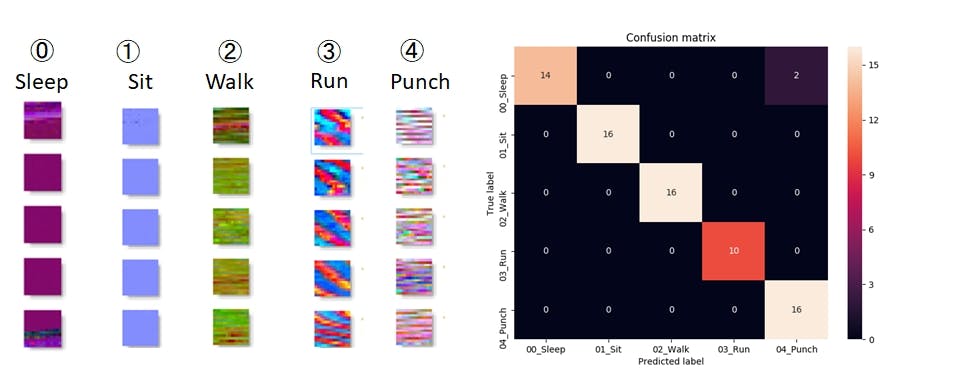
加速模型是通过深度学习创建的。每个活动的加速度图像都被分类到 M5StickV SD 卡中。使用 Keras 从 CNN 的分类和图像中学习。学习结果用 Kmodel 保存。
poYBAGOiao2AA1jyAAB-wXuwgEk788.jpg
 

按照以下命令在 Ubuntu 上运行 PYTHON 程序。

python keras_motion_larning_191030.py

https://github.com/anoken/CheeringWatch_M5StickC-V/blob/master/keras/keras_motion_larning_191030.py

生成名为 A 的“my_model.kmodel”文件。

闪存图形用户界面

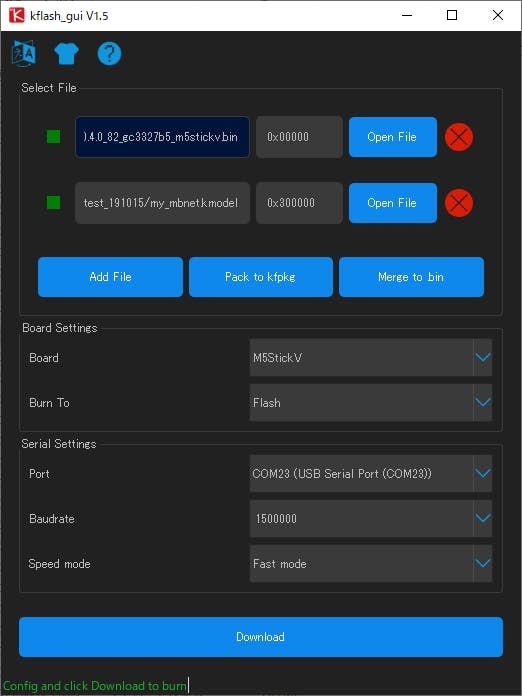
用工具编写m5stickv固件和kmodel。
pYYBAGOiapGATVV-AAB5Bw14Mcw266.jpg
 

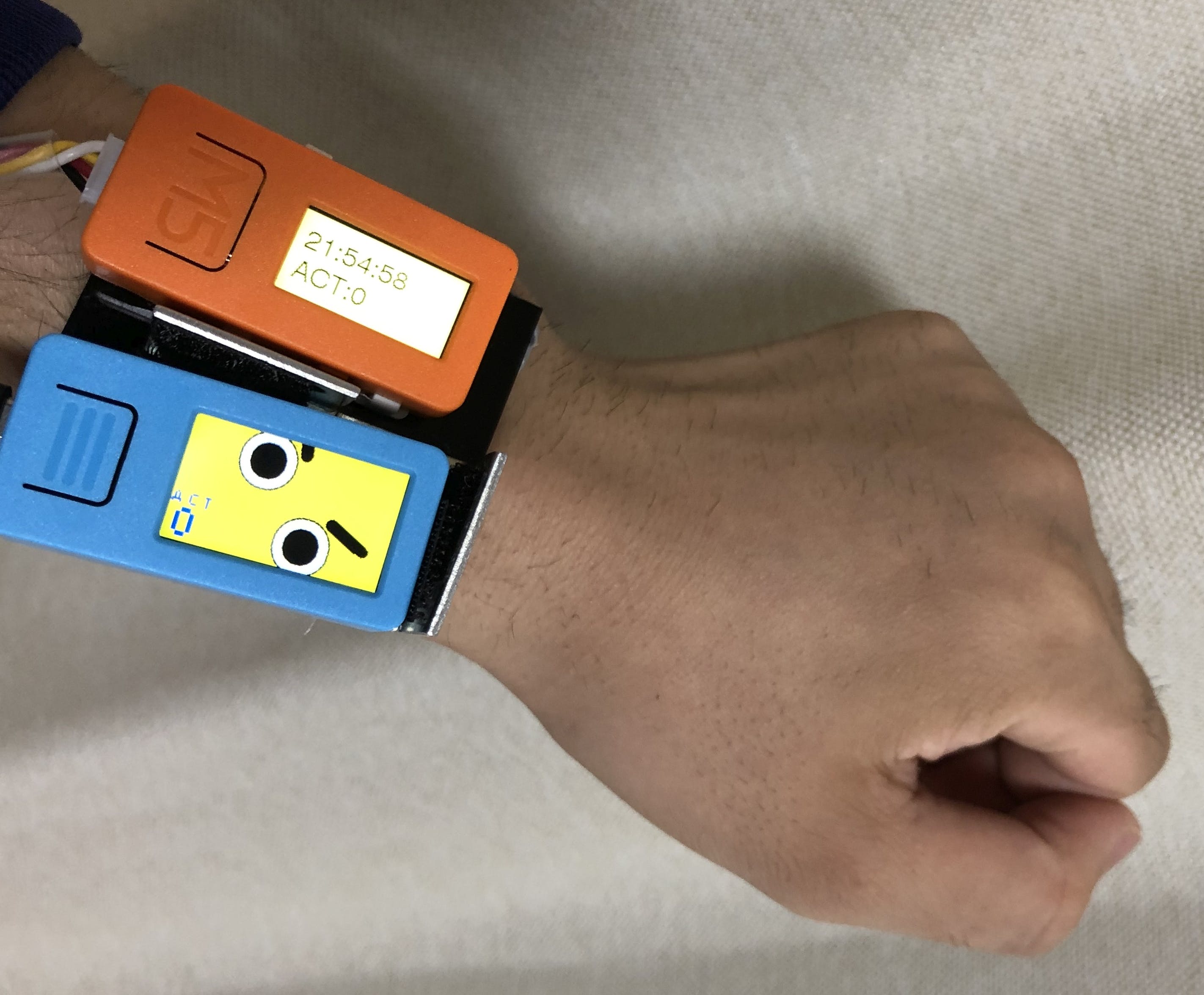
画脸说话

显示一张友好的脸来帮助你。这张脸像万向节一样旋转到倾斜。此外,音频根据动作输出。
poYBAGOiarOAUunzAAU1osS_8DE057.jpg
 

https://github.com/anoken/CheeringWatch_M5StickC-V/blob/master/m5stickv_maixpy/m5stickv_imu_to_pixel_detec_191027.py

环境连接

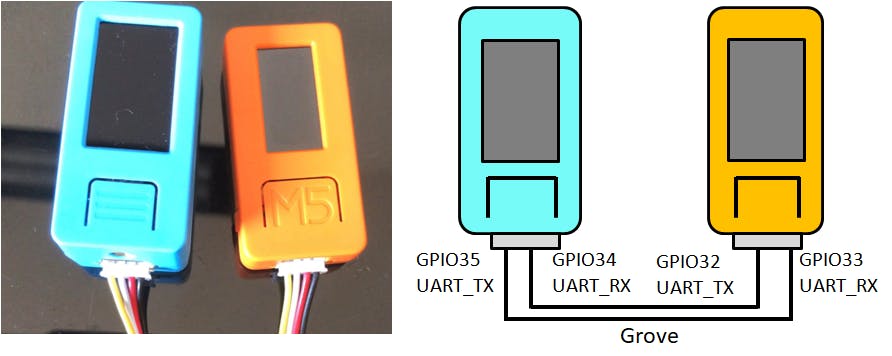
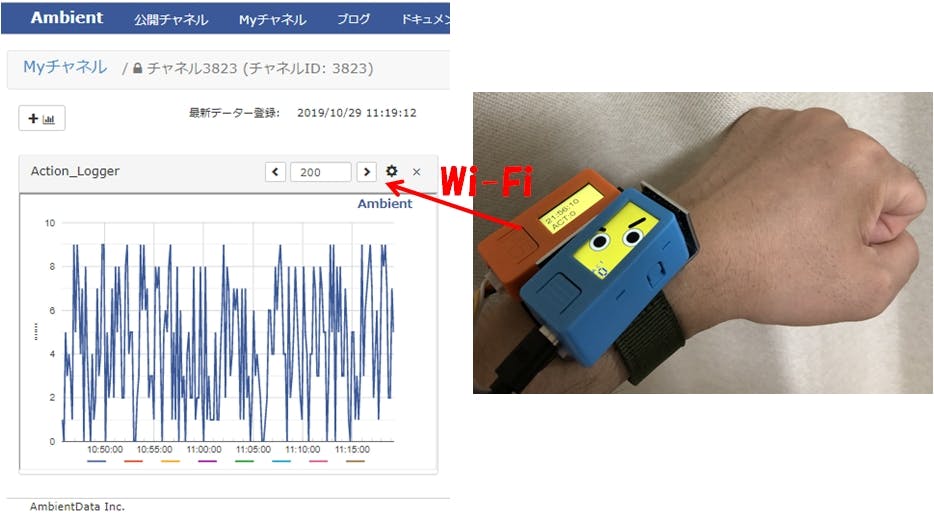
m5stickv 无法连接到互联网。所以将它连接到 M5StickC 并连接到互联网。将运动数据发送到日本的环境云服务。
pYYBAGOiaraAWxavAACGTi4syPg262.png
 

m5stickc软件使用arduino创建编程。从URT接收并发送到AMBIENT。它还从网络获取当前时间并显示时间。
poYBAGOiarmALPxDAADMdd1YLPM208.jpg
 

https://github.com/anoken/CheeringWatch_M5StickC-V/blob/master/m5stickc/m5stickc_time_recieve_activity_send_ambient.ino


声明:本文内容及配图由入驻作者撰写或者入驻合作网站授权转载。文章观点仅代表作者本人,不代表电子发烧友网立场。文章及其配图仅供工程师学习之用,如有内容侵权或者其他违规问题,请联系本站处理。 举报投诉

评论(0)
发评论

下载排行榜

全部0条评论

快来发表一下你的评论吧 !

'+ '

'+ '

'+ ''+ '
'+ ''+ ''+ '
'+ ''+ '' ); $.get('/article/vipdownload/aid/'+webid,function(data){ if(data.code ==5){ $(pop_this).attr('href',"/login/index.html"); return false } if(data.code == 2){ //跳转到VIP升级页面 window.location.href="//m.obk20.com/vip/index?aid=" + webid return false } //是会员 if (data.code > 0) { $('body').append(htmlSetNormalDownload); var getWidth=$("#poplayer").width(); $("#poplayer").css("margin-left","-"+getWidth/2+"px"); $('#tips').html(data.msg) $('.download_confirm').click(function(){ $('#dialog').remove(); }) } else { var down_url = $('#vipdownload').attr('data-url'); isBindAnalysisForm(pop_this, down_url, 1) } }); }); //是否开通VIP $.get('/article/vipdownload/aid/'+webid,function(data){ if(data.code == 2 || data.code ==5){ //跳转到VIP升级页面 $('#vipdownload>span').text("开通VIP 免费下载") return false }else{ // 待续费 if(data.code == 3) { vipExpiredInfo.ifVipExpired = true vipExpiredInfo.vipExpiredDate = data.data.endoftime } $('#vipdownload .icon-vip-tips').remove() $('#vipdownload>span').text("VIP免积分下载") } }); }).on("click",".download_cancel",function(){ $('#dialog').remove(); }) var setWeixinShare={};//定义默认的微信分享信息,页面如果要自定义分享,直接更改此变量即可 if(window.navigator.userAgent.toLowerCase().match(/MicroMessenger/i) == 'micromessenger'){ var d={ title:'M5StickC&V的应援表开源硬件',//标题 desc:$('[name=description]').attr("content"), //描述 imgUrl:'https://'+location.host+'/static/images/ele-logo.png',// 分享图标,默认是logo link:'',//链接 type:'',// 分享类型,music、video或link,不填默认为link dataUrl:'',//如果type是music或video,则要提供数据链接,默认为空 success:'', // 用户确认分享后执行的回调函数 cancel:''// 用户取消分享后执行的回调函数 } setWeixinShare=$.extend(d,setWeixinShare); $.ajax({ url:"//www.obk20.com/app/wechat/index.php?s=Home/ShareConfig/index", data:"share_url="+encodeURIComponent(location.href)+"&format=jsonp&domain=m", type:'get', dataType:'jsonp', success:function(res){ if(res.status!="successed"){ return false; } $.getScript('https://res.wx.qq.com/open/js/jweixin-1.0.0.js',function(result,status){ if(status!="success"){ return false; } var getWxCfg=res.data; wx.config({ //debug: true, // 开启调试模式,调用的所有api的返回值会在客户端alert出来,若要查看传入的参数,可以在pc端打开,参数信息会通过log打出,仅在pc端时才会打印。 appId:getWxCfg.appId, // 必填,公众号的唯一标识 timestamp:getWxCfg.timestamp, // 必填,生成签名的时间戳 nonceStr:getWxCfg.nonceStr, // 必填,生成签名的随机串 signature:getWxCfg.signature,// 必填,签名,见附录1 jsApiList:['onMenuShareTimeline','onMenuShareAppMessage','onMenuShareQQ','onMenuShareWeibo','onMenuShareQZone'] // 必填,需要使用的JS接口列表,所有JS接口列表见附录2 }); wx.ready(function(){ //获取“分享到朋友圈”按钮点击状态及自定义分享内容接口 wx.onMenuShareTimeline({ title: setWeixinShare.title, // 分享标题 link: setWeixinShare.link, // 分享链接 imgUrl: setWeixinShare.imgUrl, // 分享图标 success: function () { setWeixinShare.success; // 用户确认分享后执行的回调函数 }, cancel: function () { setWeixinShare.cancel; // 用户取消分享后执行的回调函数 } }); //获取“分享给朋友”按钮点击状态及自定义分享内容接口 wx.onMenuShareAppMessage({ title: setWeixinShare.title, // 分享标题 desc: setWeixinShare.desc, // 分享描述 link: setWeixinShare.link, // 分享链接 imgUrl: setWeixinShare.imgUrl, // 分享图标 type: setWeixinShare.type, // 分享类型,music、video或link,不填默认为link dataUrl: setWeixinShare.dataUrl, // 如果type是music或video,则要提供数据链接,默认为空 success: function () { setWeixinShare.success; // 用户确认分享后执行的回调函数 }, cancel: function () { setWeixinShare.cancel; // 用户取消分享后执行的回调函数 } }); //获取“分享到QQ”按钮点击状态及自定义分享内容接口 wx.onMenuShareQQ({ title: setWeixinShare.title, // 分享标题 desc: setWeixinShare.desc, // 分享描述 link: setWeixinShare.link, // 分享链接 imgUrl: setWeixinShare.imgUrl, // 分享图标 success: function () { setWeixinShare.success; // 用户确认分享后执行的回调函数 }, cancel: function () { setWeixinShare.cancel; // 用户取消分享后执行的回调函数 } }); //获取“分享到腾讯微博”按钮点击状态及自定义分享内容接口 wx.onMenuShareWeibo({ title: setWeixinShare.title, // 分享标题 desc: setWeixinShare.desc, // 分享描述 link: setWeixinShare.link, // 分享链接 imgUrl: setWeixinShare.imgUrl, // 分享图标 success: function () { setWeixinShare.success; // 用户确认分享后执行的回调函数 }, cancel: function () { setWeixinShare.cancel; // 用户取消分享后执行的回调函数 } }); //获取“分享到QQ空间”按钮点击状态及自定义分享内容接口 wx.onMenuShareQZone({ title: setWeixinShare.title, // 分享标题 desc: setWeixinShare.desc, // 分享描述 link: setWeixinShare.link, // 分享链接 imgUrl: setWeixinShare.imgUrl, // 分享图标 success: function () { setWeixinShare.success; // 用户确认分享后执行的回调函数 }, cancel: function () { setWeixinShare.cancel; // 用户取消分享后执行的回调函数 } }); }); }); } }); } function openX_ad(posterid, htmlid, width, height) { if ($(htmlid).length > 0) { var randomnumber = Math.random(); var now_url = encodeURIComponent(window.location.href); var ga = document.createElement('iframe'); ga.src = 'https://www1.elecfans.com/www/delivery/myafr.php?target=_blank&cb=' + randomnumber + '&zoneid=' + posterid+'&prefer='+now_url; ga.width = width; ga.height = height; ga.frameBorder = 0; ga.scrolling = 'no'; var s = $(htmlid).append(ga); } } openX_ad(828, '#berry-300', 300, 250);